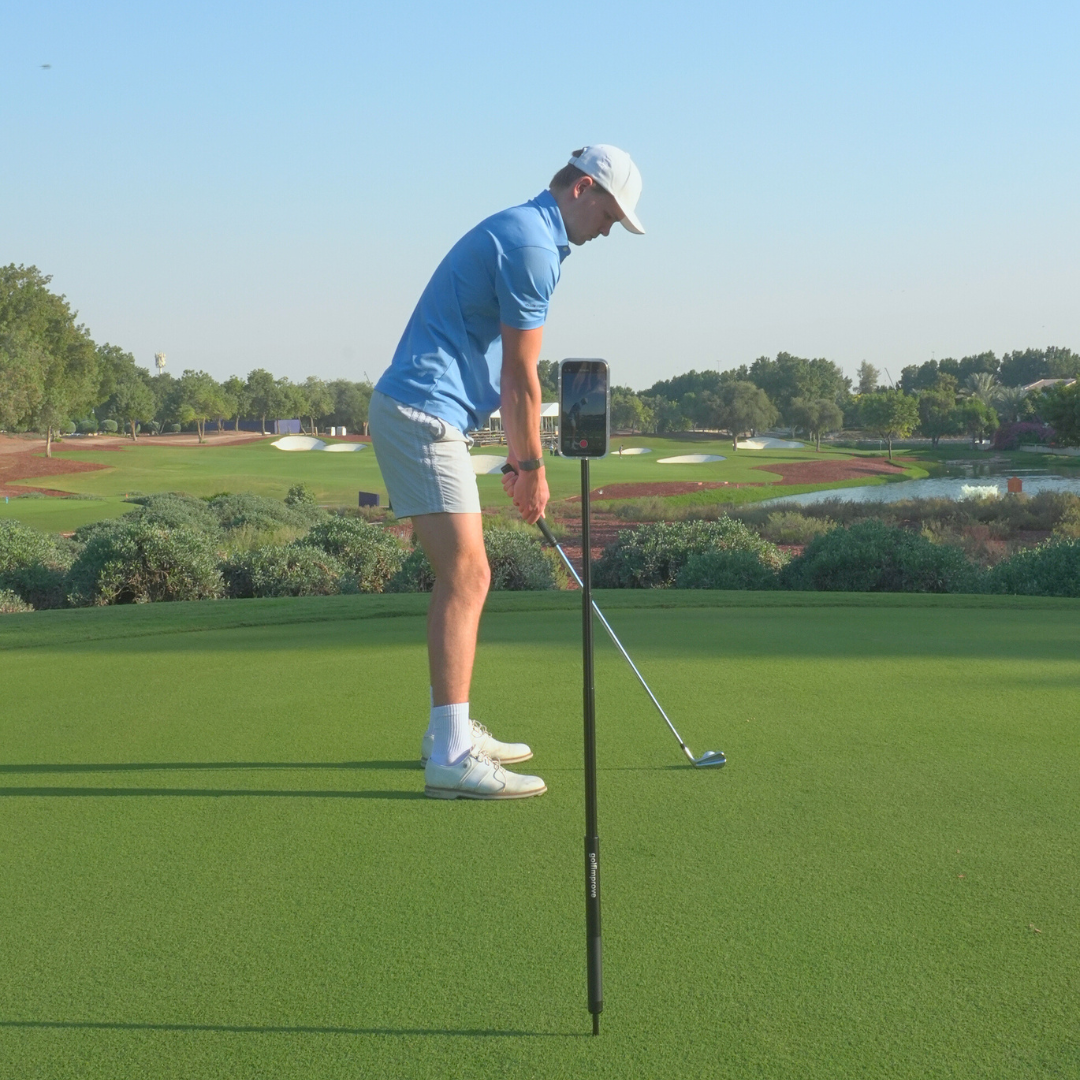
To film your own golf swing, put your phone on a stand about 3 metres away, at roughly hand height, and record two angles: down-the-line (from behind, along your target line) and face-on (facing your chest). Use slow motion, keep the camera still, and film the same angle every session so you can compare.
That's the short version. Below is how to get each angle right, the settings to use, and the mistakes that make footage useless.
Why film your swing at all?
What you feel and what you do are rarely the same thing. A swing that feels short often isn't, and a takeaway that feels inside is often fine. Video settles it. It also gives your coach something concrete to look at between lessons, and it lets you see whether a change you're working on is actually happening.
Angle 1: down-the-line
This is the view from behind you, looking at the target. It shows your swing plane, club path, takeaway and whether you stay in your posture.
- Position: directly behind your hands, on a line parallel to your target line. Not behind the ball and not behind your heels. Lining up on your hands is the standard most coaches use.
- Height: roughly at hand height at address, around hip height for most golfers.
- Distance: about 3 metres back, so the whole club stays in the frame at the top of the swing.
Tip: lay an alignment stick or a club on the ground along your target line. Then you can check on video that the camera really is square to it.
Angle 2: face-on
This is the view from in front of you, as if someone is standing opposite your chest. It shows weight shift, ball position, head movement, wrist hinge and shaft lean at impact.
- Position: straight opposite your chest, at 90 degrees to your target line.
- Height: around chest height, or slightly lower.
- Distance: about 3 metres, far enough that the clubhead stays in frame at the top and the finish.
Phone settings that make a difference
- Slow motion. The downswing takes a fraction of a second. At normal speed you'll see a blur. Use the slow-motion mode on your phone.
- Lock focus and exposure. On most phones you can long-press the screen to lock them, so the camera doesn't refocus mid-swing.
- Plenty of light. Slow motion needs light. Outside in daylight is easiest; under a dark range roof, footage gets grainy.
- Don't zoom. Digital zoom softens the picture. Move the stand instead.
The mistakes that ruin the footage
- The camera moves. A phone leaning against your bag shifts every time you hit. If the angle changes between swings, you can't compare them.
- The angle is off. A camera that is slightly open or closed to the target line makes a good swing plane look wrong. This is the most common reason golfers "fix" something that wasn't broken.
- Different setup every session. Mark where the stand goes (for example two steps back from your hands) so this week's video matches last week's.
- Only filming the good ones. Film a series of five or ten swings. Patterns matter more than one swing.
What to look at first
Don't try to analyse everything. Pick one thing per session. Down-the-line: is the club on plane halfway back, and do you keep your posture through impact? Face-on: does your weight move to the lead side, and is your head steady? Compare with a swing from a few weeks ago rather than with a tour player.
What you need
A phone and something that holds it steady at the right height. That's why we made the Golfimprove Stand: full aluminium, extends to 1.35 m, holds on grass with the ground pin or on a flat surface with the tripod, and the MagSafe head (with plates for Android and older iPhones) keeps the phone in place during a full swing. Whatever you use, the point is the same: the camera stays still and in the same spot every time.
Quick checklist
- Stand about 3 m away
- Down-the-line: behind your hands, at hand height
- Face-on: opposite your chest, at chest height
- Slow motion on, focus locked
- Same setup every session
- Film a series, look at one thing at a time
Questions about filming your swing? Check our FAQ or mail us at info@golfimprove.eu.